How to view upcoming gifts for employees and clients
Use the Upcoming gifts section in Reports to see scheduled employee and client gifts by month, plus which budgets are covered by remaining credit.
Part 01
Find upcoming gifts
Upcoming rows are driven by gift rules plus roster dates for birthdays and anniversaries.
Step 1
How do I view upcoming gifts for employees and clients?
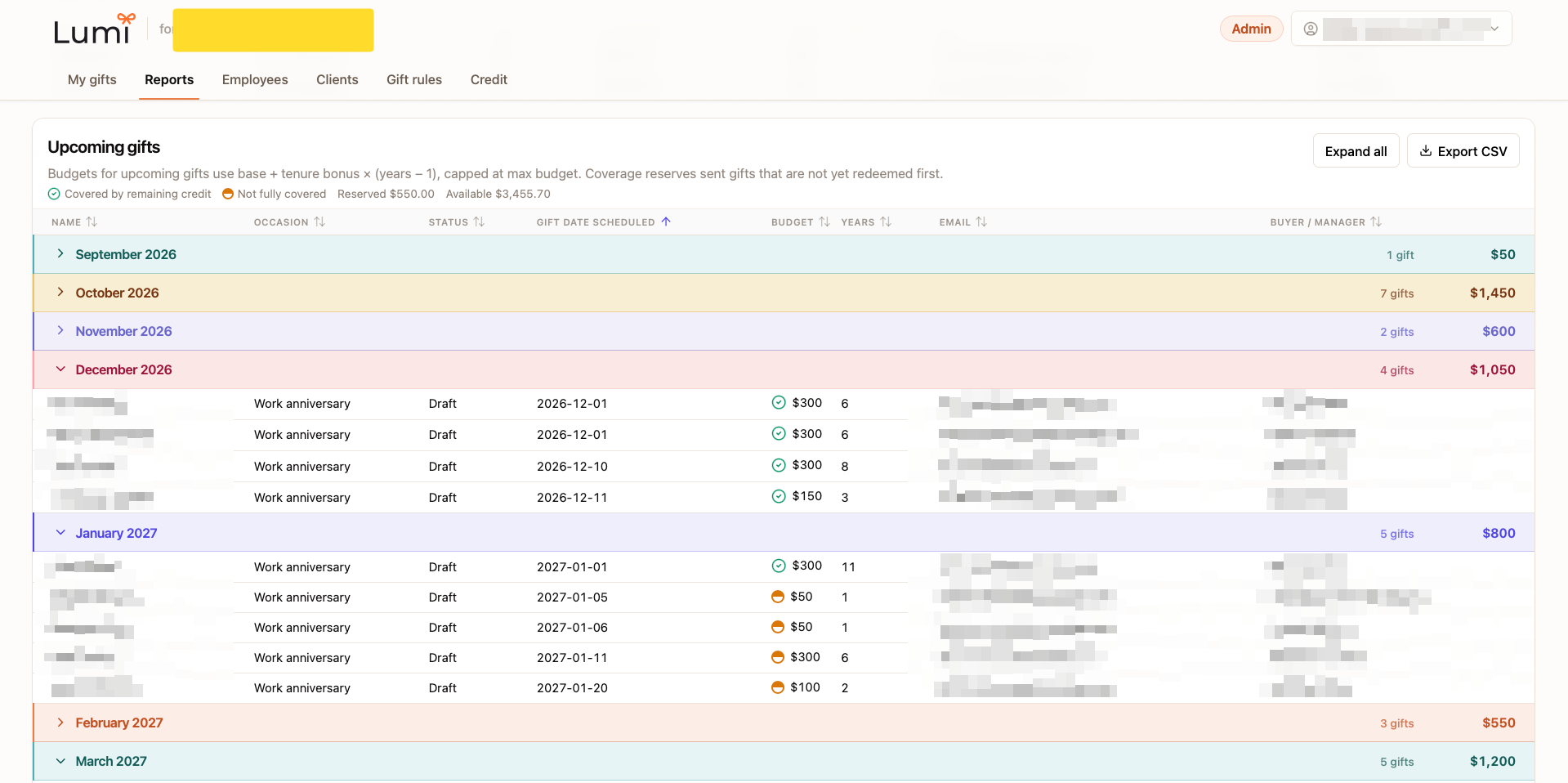
Sign in to your Lumi business workspace, then open the Reports tab and scroll to Upcoming gifts. Rows are grouped by month and show name, occasion, status, scheduled date, budget, years of tenure, email, and buyer or manager.
Step 2
How do I see which upcoming gifts are covered by credit?
In Upcoming gifts, check the coverage legend. A green check means covered by remaining credit. An half-filled orange circle means not fully covered. Reserved credit for sent-but-not-redeemed gifts is shown first, then available credit for what is still scheduled.
Step 3
How do I expand months and export upcoming gifts?
Use Expand all to open every month group, or click a month row to expand just that period. Click Export CSV to download the upcoming list for planning with finance or managers.
Ready to send the next gift?
Send a workplace gift now, or create a business account to see Upcoming gifts on Reports.